Description#
- Build a model based on a fine-tuned one using PyTorch Lightning on Google Colab Pro.
- Optimise hyperparameters and visualise evaluation metrics with Weights & Biases.
Introduction#
- This article gives a brief introduction to implementing a minimal action recognition model using a pre-trained model (3D ResNet).
- It does not cover tuning methods such as data augmentation or learning rate schedulers.
- All data and graphs in this article are dummy.
1. What is Action Recognition?#
In this article, action recognition is defined as classifying an action from a video.
2. Required Environment and Brief Explanations#
I used the following tools to develop the model:
-
Google Colab Pro
- Used to run training and inference. In this article, a T4 GPU with High RAM is used.
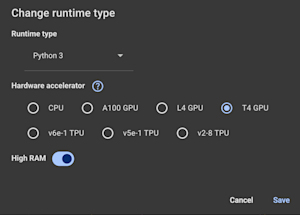
- Used to run training and inference. In this article, a T4 GPU with High RAM is used.
-
Weights & Biases (W&B)
- An AI developer platform consisting of three main products: Weave, Models, and Inference.
- In this article, Models is used to manage experiments.
- Also used to log evaluation metrics and optimise hyperparameters.
-
PyTorch
- Deep learning framework.
-
PyTorch Lightning
- A wrapper for PyTorch.
3. Environment Setup#
Before we start, we need to create a W&B account and place the dataset on Google Drive.
- Create a W&B account
- Annotate and place the video dataset on Google Drive
If the target classes are three, the directory structure is as follows:
     Dataset
       ├── Train
       │   ├── class1
       │   │   ├── class1_01_t.mp4
       │   │   ├── class1_02_t.mp4
       │   │   ├── class1_03_t.mp4
       │   │   └── ...
       │   ├── class2
       │   │   ├── class2_01_t.mp4
       │   │   ├── class2_02_t.mp4
       │   │   └── ...
       │   └── class3
       │       └── ...
       └── Val
           ├── class1
           │   ├── class1_01_v.mp4
           │   ├── class1_02_v.mp4
           │   ├── class1_03_v.mp4
           │   └── ...
           ├── class2
           │   └── ...
           └── class3
               └── ...
- Train/validation split
The appropriate ratio of training to validation data is usually between 6:4 and 8:2.
This task is basic action recognition, so we don’t need to specify the action area or the start and end times. Simply placing the files into the corresponding folders serves as the annotation.
4. Implementation for Training#
1. Mount drive and install libraries.
mount and define dataset path
from google.colab import drive
drive.mount('/content/drive')

WANDB_PROJECT = "3D ResNet"
import os
GOOFLE_DRIVE_DATASET_PATH = 'drive/My Drive/Colab Notebooks/XXX/'
TRAIN_VAL_DATASET_PATH = os.path.join(GOOFLE_DRIVE_DATASET_PATH, 'trial')
print(os.listdir(TRAIN_VAL_DATASET_PATH)) # >> ['train', 'val']
Install libraries
%%capture
!pip install fvcore
!pip install av
!pip install lightning
!pip install wandb
Note: By adding %%capture in a cell, hide install logs.
2. Hyperparameter config
Login W&B
import wandb
wandb.login()
Set hyperparameter config
By using W&B Sweeps, we can implement hyperparameter optimisation effectively.
sweep_config = {
    'method': 'bayes'
    }
metric = {
    'name': 'val_loss',
    'goal': 'minimize'
    }
sweep_config['metric'] = metric

parameters_dict = {
    'num_epochs': {
        'min': 10, 'max': 50
        },
    'lr': {
        'min': 5e-4,
        'max': 1e-3,
        'distribution': 'log_uniform_values',
        },
    'subsample':{
          'values': [13, 20, 30, 40] # controls temporal subsampling of video frames, x3d-s requires at least 13 frames.
        },
    'sampling_rate':{
          'values': [4]
        },
    'clip_duration':{
          'values': [2]
        },
    'batch_size':{
          'values': [24]
    },
    'num_workers':{
          'values': [8]
    },
    'data_path':{
          'values': [TRAIN_VAL_DATASET_PATH]
    },
}

sweep_config['parameters'] = parameters_dict

import pprint
pprint.pprint(sweep_config)

sweep_id = wandb.sweep(sweep_config, project=WANDB_PROJECT)
3. Data module function
By running torch.hub.list(), avoid inconsistency of torchvision and pytorchvideo without specifying version.
import torch
Torch.hub.list('facebookresearch/pytorchvideo',force_reload=False
Define data modules.
import os
import lightning as L
import pytorchvideo.data
import torch.utils.data
from lightning.pytorch.callbacks import ModelCheckpoint
from pytorchvideo.transforms import (
	ApplyTransformToKey,
	Normalize,
	RandomShortSideScale,
	RemoveKey,
	ShortSideScale,
	UniformTemporalSubsample
)
from torchvision.transforms import (
	Compose,
	Lambda,
	RandomCrop,
	RandomHorizontalFlip,
	Resize,
	ColorJitter
)

class KineticsDataModule(L.pytorch.LightningDataModule):
  # Dataset configuration
  def __init__(self, subsample, batch_size, num_workers, data_path, clip_duration):
	super().__init__()
	self.subsample = subsample
	self.batch_size = batch_size
	self.num_workers = num_workers
	self.data_path = data_path
	self.clip_duration = clip_duration

  def train_dataloader(self):

	train_transform = Compose(
		[
		ApplyTransformToKey(
			key='video',
			transform=Compose(
				[
					UniformTemporalSubsample(self.subsample),
					Lambda(lambda x: x / 255.0),
					Normalize((0.45, 0.45, 0.45), (0.225, 0.225, 0.225)),
					Resize((224, 224)),
				]
			)
		)
		]
	)

	train_dataset = pytorchvideo.data.Kinetics(
		data_path=os.path.join(self.data_path, 'train'),
		clip_sampler=pytorchvideo.data.make_clip_sampler('random',self.clip_duration),
		decode_audio=False,
		transform=train_transform
	)
	return torch.utils.data.DataLoader(
		train_dataset,
		batch_size=self.batch_size,
		num_workers=self.num_workers,
		pin_memory=True,
		persistent_workers=True
	)

  def val_dataloader(self):

	val_transform = Compose(
		[
		ApplyTransformToKey(
			key='video',
			transform=Compose(
				[
					UniformTemporalSubsample(self.subsample),
					Lambda(lambda x: x / 255.0),
					Normalize((0.45, 0.45, 0.45), (0.225, 0.225, 0.225)),
					Resize((224, 224)),
				]
			)
		)
		]
	)

	val_dataset = pytorchvideo.data.Kinetics(
		data_path=os.path.join(self.data_path, 'val'),
		clip_sampler=pytorchvideo.data.make_clip_sampler('uniform',self.clip_duration),
		decode_audio=False,
		transform=val_transform
	)
	return torch.utils.data.DataLoader(
		val_dataset,
		batch_size=self.batch_size,
		num_workers=self.num_workers,
		pin_memory=True,
		persistent_workers=True
	)
4. Load a model and freeze layers.
Load a pretrained model and freeze all layers except classifier (Transfer learning).
Depending on the number of target classes, we need to change num_features (currently, num_features = 3).
def make_pretrained_resnet(freeze_backbone=True):
	model = torch.hub.load('facebookresearch/pytorchvideo', 'slow_r50', pretrained=True)
	# Freeze all layers
	if freeze_backbone:
		for param in model.parameters():
			param.requires_grad = False
	# Replace classifier
	num_features = model.blocks[-1].proj.in_features
	model.blocks[-1].proj = torch.nn.Linear(num_features, 3)
	return model
5. Training function.
import torch
import torch.nn as nn
import torch.nn.functional as F

class VideoClassificationLightningModule(L.LightningModule):
  def __init__(self, learning_rate):
    super().__init__()
    self.model = make_pretrained_resnet()
    self.learning_rate = learning_rate
    self.save_hyperparameters()

    if wandb.run is not None:
      wandb.watch(self.model, log="all", log_freq=100)

      # Log model info
      trainable_params = sum(p.numel() for p in self.model.parameters() if p.requires_grad)
      total_params = sum(p.numel() for p in self.model.parameters())

      wandb.log({
          "model/trainable_parameters": trainable_params,
          "model/total_parameters": total_params,
          "model/frozen_ratio": (total_params - trainable_params) / total_params
      })

  def forward(self, x):
    return self.model(x)

  def training_step(self, batch, batch_idx):
    y_hat = self.model(batch['video'])

    loss = F.cross_entropy(y_hat, batch['label'])

    self.log('train_loss', loss, prog_bar=True)
    self.log('learning_rate', self.optimizers().param_groups[0]['lr'], prog_bar=True)

    return loss

  def validation_step(self, batch, batch_idx):
    y_hat = self.model(batch['video'])
    loss = F.cross_entropy(y_hat,  batch['label'])
    self.log('val_loss', loss)
    return loss

  def configure_optimizers(self):
    return torch.optim.Adam(self.parameters(), lr=self.learning_rate)

from lightning.pytorch.loggers import WandbLogger
from lightning.pytorch import Trainer

def train():
  wandb.init(project=WANDB_PROJECT)
  config = wandb.config
  print("config",config)
  classification_module = VideoClassificationLightningModule(
      learning_rate=config.lr
  )
  data_module = KineticsDataModule(
      subsample=config.subsample,
      batch_size=config.batch_size,
      num_workers=config.num_workers,
      data_path=config.data_path,
      clip_duration=config.clip_duration,
  )

  wandb_logger = WandbLogger(log_model="all")
  trainer = Trainer(
      logger=wandb_logger,
      max_epochs=config.num_epochs,
      accelerator='auto',
      devices=1,
  )

  trainer.fit(classification_module, data_module)
- Run Hyperparameter optimisation.
wandb.agent(sweep_id, train, count=10) #count is a number of trials
wandb.finish()
We can check evaluation metrics on W&B dashboard.

5. Implementation for Inference#
1. Define inference function.
Depending on the target classes, we need to change class_names (currently, "Class A", "Class B", "Class C"). By defining the inference function as a another project, I managed inference results in another project (currently, project='inference_project').
import torch
import os
import wandb
from pytorchvideo.data.encoded_video import EncodedVideo
from torchvision.transforms import Compose, Lambda
from torchvision.transforms._transforms_video import NormalizeVideo
from pytorchvideo.transforms import (
    ApplyTransformToKey,
    UniformTemporalSubsample,
    ShortSideScale,
)

def run_inference(video_path, artifact_path):
    """
    Run inference using trained model from W&B

    Args:
        video_path: Path to video file
        artifact_path: W&B artifact path
    """
    wandb.init(project='inference_project')

    # Set device
    device = "cuda" if torch.cuda.is_available() else "cpu"
    print(f"Using device: {device}")

    # Initialize W&B and download artifact
    print("Loading model from W&B...")
    artifact = wandb.use_artifact(artifact_path, type='model')
    artifact_dir = artifact.download()

    # Find and load the checkpoint (W&B downloads it for you)
    checkpoint_file = [f for f in os.listdir(artifact_dir) if f.endswith('.ckpt')][0]
    checkpoint_path = os.path.join(artifact_dir, checkpoint_file)

    # Load model directly from the downloaded checkpoint
    model = VideoClassificationLightningModule.load_from_checkpoint(checkpoint_path)
    model.eval()
    model = model.to(device)

    # Get the run that created this artifact
    run = artifact.logged_by()

    # Get config from the run
    config = run.config
    print(f"Model config: {config}")
    subsample = config['subsample']
    sampling_rate = config['sampling_rate']

    # Define class names
    class_names = [
        "Class A", "Class B", "Class C"
    ]

    # Define input transform using config values
    transform = ApplyTransformToKey(
        key="video",
        transform=Compose([
            UniformTemporalSubsample(subsample),
            Lambda(lambda x: x/255.0),
            NormalizeVideo([0.45, 0.45, 0.45], [0.225, 0.225, 0.225]),
            ShortSideScale(size=224),
        ]),
    )

    clip_duration = 2
    # Load and preprocess video
    print(f"Loading video: {video_path}")
    video = EncodedVideo.from_path(video_path)
    video_data = video.get_clip(start_sec=0, end_sec=clip_duration)

    # Apply transforms and prepare input
    video_data = transform(video_data)
    inputs = video_data["video"].to(device)

    # Run inference
    print("Running inference...")
    with torch.no_grad():
        preds = model(inputs[None, ...])

    # Get predictions
    post_act = torch.nn.Softmax(dim=1)
    preds = post_act(preds)
    pred_classes = preds.topk(k=3).indices[0]
    pred_scores = preds.topk(k=3).values[0]

    print("\nPredicted labels:")
    for i, (class_idx, score) in enumerate(zip(pred_classes, pred_scores)):
        print(f"{i+1}. {class_names[class_idx]}: {score:.4f}")

    wandb.finish()

    return pred_classes, pred_scores
2. Load a model from W&B and run inference.
Find the best model from the W&B Artifact, and load it.
video_path = os.path.join(GOOFLE_DRIVE_DATASET_PATH, 'sample.mp4')
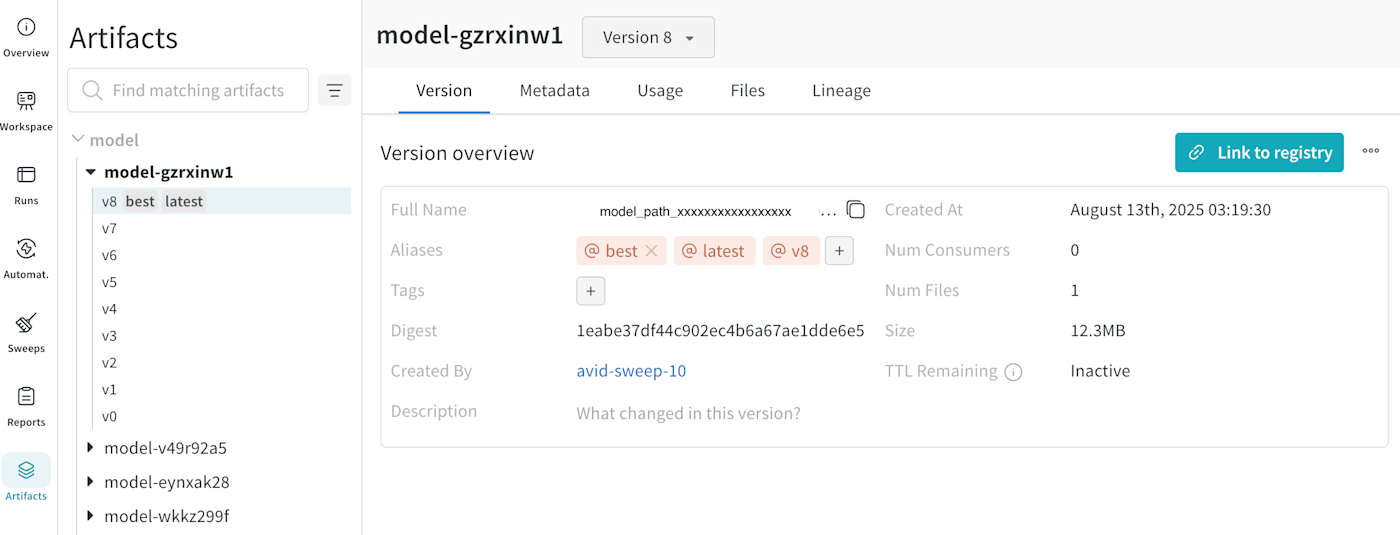
artifact_path = 'w&b_artifact_model_path'

pred_classes, pred_scores = run_inference(video_path, artifact_path)
We can check the model path from W&B Artifact (Full Name is a model path).
Output example:
Predicted labels:
1. Class A: 0.9042
2. Class B: 0.0838
3. Class C: 0.0119